Design engineering
BaiOS
A personal website you can work inside.
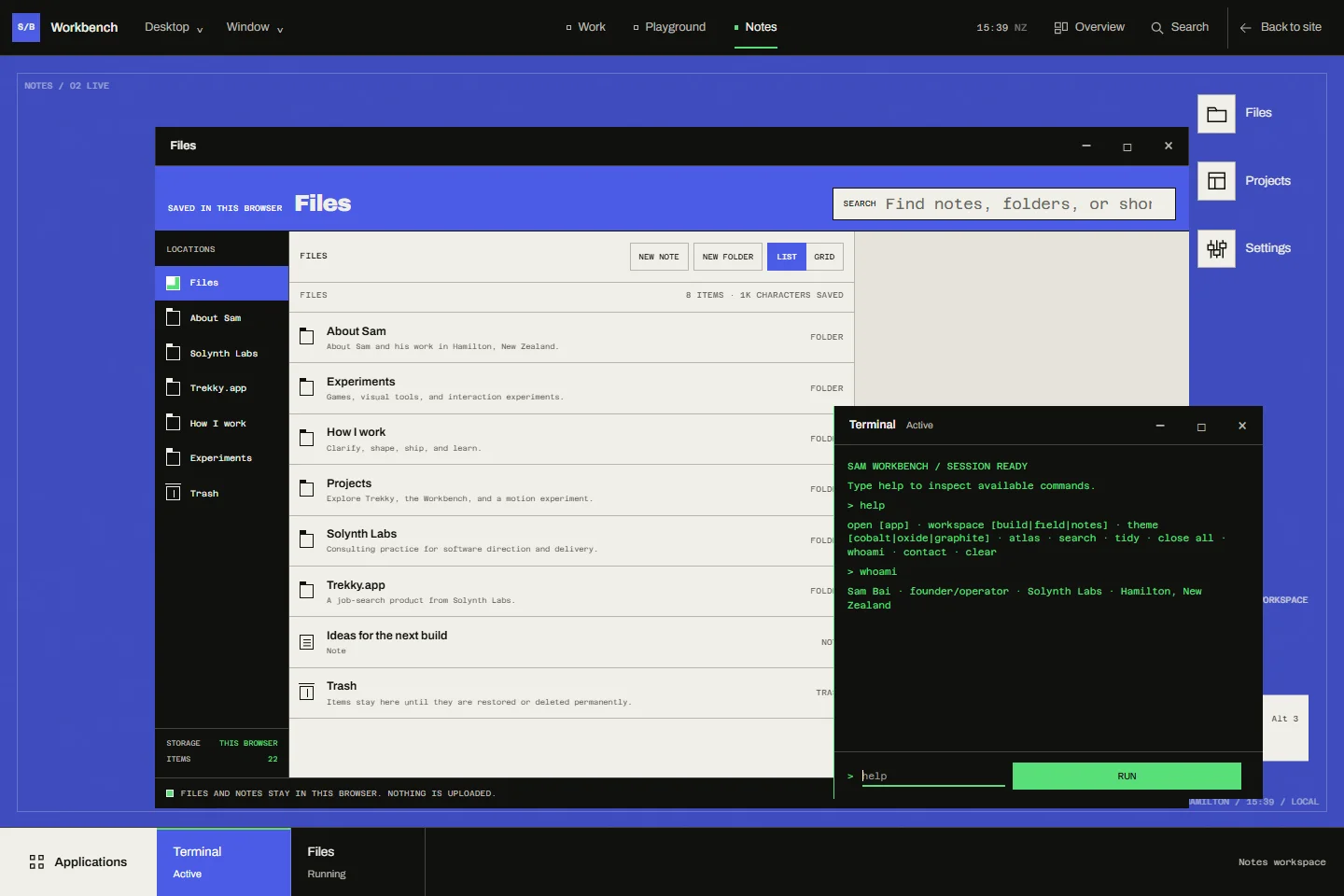
About the project
I built Workbench into this portfolio so visitors can try the windows, local files, tools, and experiments themselves.
Let visitors try the interface
I made the portfolio itself a piece of working software. The public page stays simple, while Workbench opens a desktop that visitors can use directly. Work, Playground, and Notes give projects, experiments, and personal writing their own places, with familiar controls for finding an app and moving between tasks.
Keep the task when the layout changes
Windows can focus, drag, resize, snap, maximize, minimize, and restore. I keep positions, app state, and appearance in the saved session, alongside local notes and folders. Compact screens show one active window at a time. The other tasks stay in the session, so adapting the layout does not discard the work.
Make recovery part of saving
I save Files and desktop state together in a validated snapshot. Backup imports are checked before replacing saved work, and damaged data is preserved for recovery. Two tabs can still disagree about the same session. When that happens, the interface asks which version to keep rather than silently choosing one.
Keep local work local
I keep desktop sessions and files in the current browser, without an account or remote sync. Moving that work to another browser needs an exported backup. Market data, search, and the AI assistant use separate network services and disclose that distinction. Games and visual tools pause when inactive, and the desktop includes keyboard controls and reduced-motion behavior.
Next project